Bangalore: E-mail can now be sent in ten different Indian languages without having to use cumbersome language software...
Invented by Tachyon Technologies, ‘Quillpad’, a free online multi-lingual typing tool for emails is a software which enables people to communicate in regional languages. Quillpad is a predictive transliteration technology which allows users to type in Indian languages in English without using any rules like earlier technologies which depended on pre-defined conditions.
Quillpad is already supporting 10 Indian Languages and one foreign language - Nepali. This software can support any language without human intervention within five to six hours of time.
Ramprakash H, CEO, Tachyon Technologies and creator of Quillpad said, “The programme developed on a mathematical technique. It automatically predicts ambiguities that arise while using Roman letters to type in Indian languages. It uses automated machine learning techniques to learn new languages”.
The user will just have to type any regional language word using the English keyboard without having to worry about the phonetics. The software can be used to communicate in Kannada, Hindi, Tamil, Telugu, Malayalam, Bengali, Punjabi, Marathi and in Nepali.
Showing posts with label freeware. Show all posts
Showing posts with label freeware. Show all posts
Sunday, August 24, 2008

Download Accelerator Plus 8.7.0.0 Beta
http://www.vnunet.com/vnunet/downloads/2128241/download-accelerator-plus
javascript:doDownload('/articles/download/2128241','it/1124292','dap87beta.exe','http://download.speedbit.com/dap87beta.exe');
Download manager that also claims to increase download speeds by up to 300 per cent.
DAP performs this trick by locating the most responsive server using a proximity test, and by splitting the file(s) into several segments and accessing them from multiple sources if necessary.
In our tests with an ADSL connection, DAP was only faster in a handful of occasions, but always saved you the trouble of manually selecting the fastest or closest server.
More usefully, DAP is also a download manager, which is a tool many of us have forgotten about. Today most people download files into a variety of locations where they can often become lost.
DAP keeps track of them all and also provides a handy history of what you've downloaded and when.
DAP will additionally recover and resume a download which has been interrupted by a broken connection. Very handy even if it doesn't necessarily make your Internet connection feel much faster.
Wednesday, August 20, 2008
Popular item 3 as per portablefreeware
FastStone Capture V5.3
Posted on 14th May 2007 - 1MB (uncompressed) - Popularity score (34551) - Suggested by Fluffy
Website - Screenshot - Download - Comments (39) - Post comment - Permalink
Category: Graphics - Screen Capture (5)
Synopsis: FastStone Capture is a powerful, flexible and intuitive screen-capture utility. It allows you to capture anything on the screen including windows, objects, full screen, rectangle regions, freehand-selected regions and scrolling windows/web pages. It has innovative features such as a floating Capture Panel, hotkeys, resizing, cropping, text annotation, printing, e-mailing, screen magnifier and many more.
Note: FastStone Capture appeared to have gone payware starting from V5.4. Since the license agreement does not prohibit redistribution, I have made the last freeware version (V5.3) available for direct download.
Writes settings to: Application folder
How to extract: Download the "Portable" ZIP package and extract to a folder of your choice. Launch the program by double-clicking on FSCapture.exe.
Stealth: Yes
Path portability: Requires manual entry of drive-less absolute path (eg. \docs\personal\work.doc without the drive letter)
Unicode support: No
License: Free for personal use
System Requirements: Win98 / WinME / WinNT / Win2K / WinXP / Vista
http://portablefreeware.com/index.php?so=p
Sunday, August 17, 2008
Freeware: Media only music Jukebox
The J. River Media Jukebox is a stripped-down but free version of the popular J. River Media Center. Popular in its own right, Media Jukebox uses the same interface as its big brother to deliver a feature set that's anything but little, but strictly limited to music support. Those in search of video and image compatibility will need to download the Media Center.
The program mimics the iTunes interface in a way that could benefit from more inspiration, but it doesn't stop the extras from shining through. You'll be able to burn and rip CDs, sync with just about any portable including iPods, tag tracks, and convert files to several popular formats. It has browser support, letting you buy music from Amazon and plug-ins for several services including Last.fm so you can find new music based on your taste. You also have your choice of skins you can download to give your player a new look. Playlists are also supported.
Former problems with encoding have been largely taken care of. Strangely, instead of providing access to CDDB, Media Jukebox uses a proprietary database that works fine with commercial CDs, but not quite as well with backup or free-floating copies. Database crashes are largely a thing of the past, and we didn't encounter any with the latest release. Many limitations get freed in the Media Center, including plug-in support, and TV recording. The forced start after installing was annoying, though not problematic.
Publisher's description of Media Jukebox
view larger
From J. River:
Media Jukebox software is a complete solution for digital music management and playback. It plays all major music formats, so you only have to use one player. Use it for full-speed ripping, burning, and encoding your music collection with automatic CD, Album art and Track look-up. It is device friendly and syncs to your iPod, PlaysForSure device, and many phones. It has the best file organization of any digital jukebox, and lets you easily create custom Playlists and Smartlists, and tag your files with the powerful tagging studio. Personalize your listening experience and get the best sound performance with EQ, DSP and audio effects - audiophiles will not be disappointed by the top-notch sound output. Many skins to choose from. Built-in services include the new Amazon MP3 store, and the Podcast feature lets you search and subscribe to podcasts from within the player. Media Jukebox is free.
http://www.download.com/Media-Jukebox/3000-2167_4-10034344.html?hhTest=1
The J. River Media Jukebox is a stripped-down but free version of the popular J. River Media Center. Popular in its own right, Media Jukebox uses the same interface as its big brother to deliver a feature set that's anything but little, but strictly limited to music support. Those in search of video and image compatibility will need to download the Media Center.
The program mimics the iTunes interface in a way that could benefit from more inspiration, but it doesn't stop the extras from shining through. You'll be able to burn and rip CDs, sync with just about any portable--including iPods, tag tracks, and convert files to several popular formats. It has browser support letting you buy music from Amazon and plug-ins for several services including Last.fm so you can find new music based on your taste. You also have your choice of skins you can download to give your player a new look. Playlists are also supported.
Former problems with encoding have been largely taken care of. Instead of providing access to CDDB, Media Jukebox uses a proprietary database that works fine with commercial CDs, but not quite as well with backup CD-R copies. Database crashes are largely a thing of the past, and we didn't encounter any with the latest release. Other limitations in the Media Jukebox that get freed in the paid version include plug-in support, TV recording, and support for Audible. We also had to restart the computer after installation, which was annoying if not problematic. Nevertheless, Media Jukebox is a good choice for users who are focused on their music collections and want a change from iTunes.
Freeware: Driver Magician Lite :manage your drivers
Driver Magician Lite lacks frills and showmanship, but the simple layout makes backing up your device drivers much easier than pulling a rabbit out of a hat.
A quick install and the small memory footprint would lead you to hope that the rest of the program runs the same way. That's no sleight-of-hand: backing up every driver on my computer, from Bluetooth and tablet controllers to Intel chipsets, took less than 5 minutes. Users can select drivers individually or hit the Select All button at the bottom of the spreadsheet-style layout. Hitting the Start Backup button opens a directory window, so you can choose where the drivers will be saved to, and then another click begins the process.
A quick install and the small memory footprint would lead you to hope that the rest of the program runs the same way. That's no sleight-of-hand: backing up every driver on my computer, from Bluetooth and tablet controllers to Intel chipsets, took less than 5 minutes. Users can select drivers individually or hit the Select All button at the bottom of the spreadsheet-style layout. Hitting the Start Backup button opens a directory window, so you can choose where the drivers will be saved to, and then another click begins the process.
We recommend creating a designated folder for backing up your drivers, since Driver Magician natively mimics your computer's folder tree and saves each driver to an appropriate folder. This, I found out the hard way, was easier than cleaning up the mess after saving them to my desktop--it was worse than trying to pick up a deck of cards splayed across a stage. The app doesn't do updating or reinstallation, unfortunately.
http://www.download.com/Driver-Magician-Lite/3000-2242_4-10521270.html?hhTest=1
Publisher's description of Driver Magician Lite
view larger
From GoldSolution:
Driver Magician Lite identifies all the hardware in the system, extracts their associated drivers from the hard disk, and backs them up to a location of your choice. Then when you format and reinstall/upgrade your operating system, you can restore all the saved drivers just as if you had the original driver diskettes in your hands.
Version 3.41 fixes a bug of detecting drivers.
http://www.download.com/Driver-Magician-Lite/3000-2242_4-10521270.html?hhTest=1
"Magically" back up drivers
Driver Magician Lite lacks frills and showmanship, but the simple layout makes backing up your device drivers much easier than pulling a rabbit out of a hat.
The quick install and small memory footprint would lead you to hope that the rest of the program runs the same way. That's no sleight-of-hand: Backing up every driver on my computer, from Bluetooth and tablet controllers to Intel chip sets, took less than five minutes. Users can select drivers individually or hit the Select All button at the bottom of the spreadsheet-style layout. Hitting the Start Backup button opens a directory window, so you can choose where the drivers will be saved to, and then another click begins the process.
We recommend creating a designated folder for backing up your drivers, since Driver Magician will mimic your computer's folder tree and save each driver to an appropriate folder. Saving those to your desktop would be harder to clean up than splaying a deck of cards across a stage. It doesn't do much else. If you need to use the drivers it's backed up for you, you'll need to install them yourself. However, you'll be hard-pressed to find such a useful tool that's as easy to use as this, and that's no trick.
Freeware: Manage PDF from firefox
The problem with opening PDF files in Firefox is that it tends to slow down your performance, especially if you open a number of them. This simple little extension gives you complete control over PDF files in a Toolbar button.
Rather than stick you all alone with a browser-jarring PDF file, the PDF Download extension provides you the option to: download the file locally, open it with Firefox using the PDF download options settings, view the PDF as an HTML file in the browser, bypass PDF Download, or cancel the link. The first two options are self-explanatory, while the "view as HTML" feature works a bit like Google's own version of the feature, speeding load times while largely abandoning formatting. The dialog box also displays the size of the target PDF file, which can help in deciding which option to choose.
The latest updates adds one incredible feature, in addition to the bug fixes. Users can now convert the Web page they're looking at into a PDF, complete with hyperlinks. It doesn't like pages with embedded content, changing Flash videos, for example, into links back to Adobe. But even with that limitation, the former Web page looks fine as a PDF. The plug-in now supports Firefox 3 and its social networking branch, Flock. PDF Download isn't fancy for an extension that bills itself as "one of the most popular Firefox add-ons ever," but it could be a big help for journalists, government workers, and others who spend considerable time with PDFs.
http://www.download.com/PDF-Download/3000-11745_4-10455334.html?hhTest=1
Publisher's description of PDF Download
view larger
From Nitro PDF Software:
Use PDF Download to do whatever you like with PDF files on the Web and regain control. WEB TO PDF - Convert any Web pages to high-quality PDF files while retaining page layout, images, text and hyperlinks, and then save, share, print or archive them. VIEW PDF AS HTML - View the contents of PDF files faster and eliminate browser problems by instantly converting any Web-based PDF to a browser-friendly HTML Web page. CONTROL PDF FILES - Stop crashes and get the upper hand on Web-based PDF files by automating and controlling how your Firefox or Flock browsers deal with them.
Version 2.0 adds a Web-to-PDF feature which retains layout, images, text and all links when converting your web pages to PDF format.
Manage PDFs from Firefox
The problem with opening PDF files in Firefox is that it tends to slow down your performance, especially if you open several of them. This simple little extension gives you complete control over PDF files in a Toolbar button.
Rather than stick you all alone with a browser-jarring PDF file, the PDF Download extension provides you the option to: download the file locally, open it with Firefox using the PDF download options settings, view the PDF as an HTML file in the browser, bypass PDF Download, or cancel the link. The first two options are self-explanatory, while the "view as HTML" feature works a bit like Google's version of the feature, speeding load times while largely abandoning formatting. The dialog box also displays the size of the target PDF file, which can help in deciding which option to choose.
The latest updates adds one incredible feature, in addition to the bug fixes. Users can now convert the Web page they're looking at into a PDF, complete with hyperlinks. It doesn't like pages with embedded content, changing Flash videos, for example, into links back to Adobe. But even with that limitation, the former Web page looks fine in as a PDF. The plug-in now supports Firefox 3 and its social networking branch, Flock. PDF Download isn't fancy for an extension that bills itself as "one of the most popular Firefox add-ons ever," but it could be a big help for journalists, government workers, and others who spend considerable time with PDFs.
Freeware: WordPress
Originally intended for blogging, but customizable into just about any configuration, WordPress is the Firefox of cross-platform content management systems, including the iPhone. Extensible and proud of it, the program itself is known for having one of the simplest installations of any CMS available.
The download is a ZIP file that comes with instructions on how to install it to your server, requiring an FTP client and administrator-level rights. Documentation for the ''five-minute install'' at its Web site is extensive, clear, and concise. The WordPress support forums haven't failed me yet in answering even my most difficult questions.
Without a doubt, the ease with which users can install updates and incorporate plug-ins is the best tool that WordPress provides. The deep extension library can be used for such large-scale changes as turning your blog into a photo gallery or online store, or something more basic like theme changes, or technical such as configuring regular database backups. WordPress is highly recommended for those who want a hands-on approach to their blogging and content managing software, but it's not for beginners.
The iPhone version emphasizes function over form, porting photo uploading and post writing and editing to the portable device. However, it's missing some crucial things like copy and paste--that's Apple's fault, but still--and comment moderation that would make this a stellar, fully functional app.
http://www.download.com/WordPress.org/3260-20_4-6268472.html?hhTest=1
WordPress.org
WordPress started in 2003 with a single bit of code to enhance the typography of everyday writing and with fewer users than you can count on your fingers and toes. Since then it has grown to be the largest self-hosted blogging tool in the world, used on hundreds of thousands of sites and seen by tens of millions of people every day.
wordpress for iphone 1.0
http://www.download.com/WordPress-for-iPhone/3000-13592_4-10867532.html?hhTest=1&tag=pub&cdlPid=10867531
Freeware: RarZilla : Free Unrar
When all you've got is a hammer, every problem looks suspiciously like a nail. RarZilla is a great little utility for automatically "unraring" RAR archives, but it's incompatible with any other archive format. Depending on what you're looking for, the program--which is also available in a portable version--is either just the tool you need or woefully inadequate.
The program does a wonderful job of unzipping--sorry, unraring--RARs, and it provides three methods for achieving that lofty goal. You can select the "RarZilla!" option from the context menu associated with any RAR file in Windows Explorer, you can double-click the RAR, or you can drag and drop the RAR onto the program interface. To aid in the last one, the program is permanently set to live on top unless you minimize it. I found that extremely annoying, but your mileage may vary. It extracts the compressed files to the same folder in which the RAR lives.
RarZilla is squarely aimed at those people who predominantly use the RAR format, but I'd like to see the program support more formats before bestowing higher praise. I can't think of anybody who uses only one kind of archive exclusively. Fans of other formats should look elsewhere for an extractor or a dual-purpose archiving/unarchiving tool.
Publisher's description of RarZilla Free Unrar
view larger
From Philipp Winterberg:
RarZilla Free Unrar is a beautiful decompression tool for RAR-archives that supports spanned archives as well as the extraction of password protected files. Decompression can be started by drag 'n' drop, double click or shell integrated context menu. To speed the whole process up, RarZilla has the option to define a default output folder or a default password or both.
Version 2.53 has program now shows directory to which it extracts in title bar during extraction, improved translations (Hungarian/Norwegian).
When all you've is got a hammer, every problem looks suspiciously like a nail. RarZilla is a great little utility for automatically unraring RAR archives, but it doesn't do much else. Depending on whether that's all you're looking for, RarZilla is either just the tool you need or woefully inadequate.
http://www.download.com/RarZilla-Free-Unrar/3000-2250_4-10647724.html?hhTest=1
The program does a wonderful job of unzipping--sorry, unraring--RARs, and it provides three methods for achieving that goal. You can select the "RarZilla!" option from the context menu associated with any RAR file in Windows Explorer, you can double-click the RAR, or you can drag and drop the RAR onto the program interface. To aid in the last one, the program is permanently set to live on top unless you minimize it. We found that annoying, but your mileage may vary. It extracts the compressed files to the same folder in which the RAR lives. RarZilla is squarely aimed at those users who predominantly use the RAR format. Fans of other archive formats should look elsewhere for an extractor or a traditional archiving/unarchiving tool.
Freeware: Senuti : Transfer from Ipod to computer
iTunes makes it really easy to put music from your computer onto your iPod--unfortunately, the reverse is not true. If you want to get music from your iPod onto your computer--say, if you had a hard-drive failure, or you just bought a new Mac--you either need to know how to use Terminal or you need an app like Senuti.
(Credit: Senuti)
This cleverly named utility essentially does what iTunes does backwards, acting as an "iPod ripper" that lets you move your music, playlists, videos, everything, onto your Mac. Senuti has been around for a few years, but it's still sub-1.0, plus it's free--so be warned that the interface is very simple and you won't get a lot of hand-holding here.
Fortunately, the online documentation is good, and if you take just a few minutes to read the short QuickStart guide and FAQ, you'll save yourself time and avoid trouble like creating duplicate tracks or inadvertently letting iTunes erase your iPod. Until El Jobso puts computing before the RIAA, Senuti is an efficient way to get around a frustrating problem.
iTunes makes it really easy to put music from your computer onto your iPod--unfortunately, the reverse is not true. If you want to get music from your iPod onto your computer (say, if you had a hard-drive failure, or you just bought a new Mac), you either need the know how to use Terminal or you need an app like Senuti. This cleverly named utility (you'll figure it out) essentially does what iTunes does backwards, acting as an "iPod ripper" that lets you move your music, playlists, videos, everything, onto your Mac. Senuti has been a round for a few years, but it's still sub-1.0, plus it's free--so be warned that the interface is very simple and you won't get a lot of hand-holding here. Fortunately, the online documentation is good, and if you take just a few minutes to read the short "QuickStart" guide and FAQ, you'll save yourself time and avoid trouble (like creating duplicate tracks or inadvertently letting iTunes erase your iPod).
http://www.download.com/Senuti/3000-2182_4-10458457.html?hhTest=1
Tuesday, August 5, 2008
MapmyIndia Navigator 2.0
MapmyIndia Navigator 2.0 now offers new street-level maps for 174 cities
- The award-winning GPS navigation device now has detailed maps for 174 Indian cities, up from existing 18 cities
- Consumers living and traveling beyond metros can now enjoy benefits of safe and comfortable travel
- Existing customers can upgrade to version 2.0 for free
New Delhi, July 7, 2008: MapmyIndia today announced a
massive addition of detailed maps to its award-winning GPS
navigation device, MapmyIndia Navigator. With this release,
MapmyIndia Navigator 2.0 now offers an unprecedented and
unparalleled coverage of street-level maps for 174 cities,
extending its dominance as India’s premium GPS navigation
product. In comparison, others are offering navigation on
phones and devices with limited and basic maps ranging from 6
to 30 cities. This release throws open an entirely new market of
Indian consumers living and traveling beyond the metros, who
can benefit from the convenience and comforts of full-featured
GPS navigation. Existing MapmyIndia Navigator owners can
upgrade to version 2.0 for free.
Travel made easy in tier 2 and 3 cities as well
In a country where road signs are often non-existent, traveling
and driving can become a frustrating experience. With the
MapmyIndia Navigator containing street level maps for 174
cities (refer to box), travelers are effortlessly guided to their
destination without needing to stop and ask strangers. With
over 4,50,000 points of interest available such as ATMs,
restaurants, hotels etc., people can search for nearby places
conveniently and get information about that place as well. The
sleek satellite-connected device shows you in real-time where
you are and in which direction you are headed, besides giving
you accurate and detailed turn-by-turn voice and map
instructions to your destination. The innovative features and
Explore your city like never before
• North: Delhi NCR (6 cities: New Delhi, Gurgaon,
Noida, Greater Noida, Faridabad, Ghaziabad), Punjab
(31 cities: Amritsar, Jalandhar, Ludhiana etc.),
Chandigarh Metro (3 cities: Chandigarh, Panchkula,
Mohali), Haryana (2 cities: Ambala, Rohtak),
Rajasthan (10 cities: Jaipur, Jodhpur, Jaisalmer,
Mount Abu etc.), Uttar Pradesh (3 cities: Agra,
Kanpur, Lucknow), Uttaranchal (18 cities: Dehradun,
Mussoorie, Nainital etc.)
• West: Maharashtra (29 cities: Mumbai, Navi
Mumbai, Thane, Pune, Nagpur etc.), Gujarat (16
cities: Ahmadabad, Surat, Vadodara etc.), Goa (10
cities: Panaji, Vasco Da Gama, Calangute etc.),
Madhya Pradesh (2 cities: Bhopal, Indore)
• South: Karnataka (3 cities: Bangalore, Mangalore,
Mysore), Tamil Nadu (5 cities: Chennai, Coimbatore,
Pondicherry etc.), Andhra Pradesh (3 cities:
Hyderabad, Secundarabad, Vishakapatnam etc.),
Kerala (26 cities: Kochi, Thiruvananthapuram,
Kozhikode etc.)
• East: West Bengal (3 cities: Kolkata, Bidhan Nagar,
Haora), Bihar (1 city: Patna), Jharkhand (2 cities:
Jamshedpur, Ranchi), Orissa (1 city: Bhubhaneshwar)
• Visit www.mapmyindia.com/navigator for full list
MapmyIndia Navigator 2.0 - Unparalleled Map Coverage
• Navigate in 174 cities with complete details of streets,
localities, sub-localities and points of interest
• Travel seamlessly to 1,30,000 towns and villages
connected by national and state highways
• Find any place with 4,50,000 points of interest across
52 categories such as restaurants, ATMs, hotels etc.
• Reach 6,40,000 unique destinations across India
Page 2 of 2
comprehensive map coverage of the MapmyIndia Navigator recently won it the Geospatial Product of the Year 2008.
“With detailed maps of 174 cities now available on MapmyIndia Navigator 2.0, we are reaching out to the large Indian
consumer market that lives beyond the major metros. This is a new step not only for MapmyIndia, but also for the GPS
navigation industry as a whole, as we introduce more Indian consumers to the concept of safe and comfortable traveling.
We remain committed to making available the best maps and navigation products to Indian consumers, today and in the
future”, says Rakesh Verma, MD, MapmyIndia.
Availability and Price
MapmyIndia Navigator is available in over 500 outlets across India, including General Motors car dealerships, car accessory
outlets, and consumer electronics retail chains and outlets. It can also be purchased from MapmyIndia directly, either
online (www.mapmyindia.com/navigator) or by calling MapmyIndia Customer Care (011-4600 9999, +91 9999 333 223/4).
Two hardware models of MapmyIndia Navigator are available: AMAX 06GP5A for Rs 17,990/- and Delphi NAV 200 for Rs
20,990/-. These prices are all inclusive and are a one-time cost only, with no recurring charges to use the product.
Entertainment features such as ability to play movies, music and photos are also built-in to the MapmyIndia Navigator,
making it the ideal navigation and entertainment companion for everyday and holiday travel.
About CE Info Systems and MapmyIndia
CE Info Systems (P) Ltd., a New Delhi-based ISO 9001-2000 Company founded in 1992, is India's leader in premium quality
digital map data and consumer navigation services. Since 1994, through continuous field surveys and state-of-the-art
mapping technology, the company has built its proprietary MapmyIndia Maps, the most comprehensive, accurate, robust
and reliable navigable map dataset for all India. MapmyIndia is driving the Indian navigation industry by providing internet,
mobile and in-car navigation products to end consumers directly as well as in partnership with leading international and
national players. The company has been providing GIS based enterprise solutions to over 500 leading corporate and
government organizations in every vertical. In 2004, MapmyIndia was short listed by NASSCOM as a showcase company for
IT innovation in India. Most recently, MapmyIndia's Managing Director was elected by GPS Business News as the "World's
GPS Businessman for the year 2007" for driving the navigation industry in India.
***
For more information contact:
White Fish Communications Pvt Ltd
Anil Nagwani: +91 98112 68046
Hemant Arya: +91 98107 80153
MapmyIndia / CE Info Systems Pvt Ltd
Rohan Verma: +91 99990 04967
Sunday, August 3, 2008
Sitemeter is up and running
http://www.sitemeter.com/ is working fine. I have added a counter as well in my blog.
Saturday, July 26, 2008
Free Mobile download sites
Free Mobile download sites
1) FS Mobile http://www.fsmobilez.com/
2) Mobile software downloads http://www.thisismyindia.com/mobile-phones/software.html
3) Windows mobile http://www.techtree.com/techtree/jsp/list.jsp?cat=&software_type=&operating_system=Windows+Mobile&fld=Search&up1_cat_id=513&list=download_search_result&q=1
5) www.wapgautam.somee.com/wap This site contains huge database of Bollywood polytones, wallpapers, Animations, Games…etc.I wonder how he (Gautam) maintains this.
6) www.wap.sayni.net Lots of downloads, Online Image Software Nicasso allows you to make your own wallpapers, Operator logos, GIFs etc. It also provides a service called gmail-mobile. This is not official gmail, but it works almost anywhere in world on any GPRS enabled handset.
7) www.geocities.com/psychonishtarian/wapsite This too has good collection of bollywood tones, classic as well as new like Dhoom2, wallpapers, animations etc
8) www.bestpinoy.wen.ru/main.wml
9) www.tagtag.com/orkutlogin Here you can login to orkut from your mobile!
10) http://www.160by2.com/160by2_mobile_application2.aspx
10 Top in India
Mini Opera is one of the best and most widely used mobile web browser available in the market today. Their latest update has been a big hit with users. Since its worldwide launch in 2006, more than 44 million people have downloaded and used Opera Mini. More than 11.9 million people used Opera Mini in March 2008.
Opera mini has surveyed anonymous traffic of more than 44 million cumulative Opera Mini users worldwide to see where mobile users chose to spend their time when using the Web on their mobile devices. The figures released have India centric data as well, which throws up interesting numbers and sites
Number 4) http://www.peperonity.com/
Number 5) http://gallery.mobile9.com/
Number 6) http://www.mocospace.com/
Number 7) http://www.160by2.com/
Number 8) http://in.mobango.com/
Numner 9) http://www.itsmy.com/
Mobile applications
1) Wordpress For Iphone : An open source application for iPhone that lets you write posts, upload images and edit your Wordpress blog on your iPhone or iPod Touch. This application was recently launched and is hot out the oven.
2) Primospot : This service allows you to find a parking spot while you are on the go. Currently the service is available only for NY area ( Manhattan and Brooklyn ) but they plan to include Queens, Philadelphia and Boston soon. To find a parking spot you need to provide zip code, address or intersection.
3) Utterz : I personally enjoy “utters.” Utterz is a mobile application that lets you create and follow discussions with friends, family and people with similar interest. To use this service simply dial 712.432.6666 if you are in US or click here for international numbers. Once you dial the number you can record your utters or hear what others are “uttering.” Your utters can be audio, images or video.
4) Mixelpix : This service allows you to share you pictures with anyone from your computer or mobile phone. If would like to send a picture from your mobile phone , simply text your images to 817-522-8132 and share it with the world, well whoever uses this service .
5) Qik : This service recently went from private beta to public beta. Qik allows you to stream live videos directly from your cell phone to the internet. You can capture and share hours and hours of videos without ever having to worry about storage on your cell phone. Qik is pronounced as “quick.”
6) Goosync : Goosync is a service that allows you to sync your google calendar to almost any mobile device. Users have an option to either use a free account or a premium account. Premium account offers additional services and costs about 39.00 US dollars approx.
7) Digby : Digby currently is available only for Blackberry users. It allows users to find, browse and buy popular name brand products from major retailers on the internet from their cell phone. Digby’s catalog is updated daily so the blackberry users always have access to the latest product. Some of the retailers on Digby are : Best Buy, Barnes and Noble, FTD and Office Max among many others.
8) Wampad : Wampad is a search engine designed for mobile browsers. This is one of the reasons the site is so minimal. Using this search engine on your mobile browser you can pretty much search any website which includes Digg, Myspace, Del.icio.us, Flickr and many more.
9) Blueapple : Blueapple is one of the most popular mobile websites that is used to search and view any video from the internet on your mobile phone. This service allows users to search over 100 million videos on the internet from their mobile phone and share with others via SMS.
10) MapMyTracks : This application is directed towards sports enthusiasts. It allows you to accurately track and or share your sporting activity over land, sea or air. To use this service users must have a GPS enabled mobile phones.
11) Shozu : With Shozu you can take your online life with you. With the use of this application you can connect and share with most online communities from your cell phone. This app literally helps you take your online life with you no matter where you go.
12) Mofuse : Mofuse helps you launch and manage a mobile version of your blog or site. To mobilize your blog/site simply enter your URL in the box provided on the site. To use this service users do need to create an account which takes less than a minute.
13) Emoze : Emoze is a free PUSH mobile email service which eliminates the need to click on send/receive every time you want to check your email via your mobile phone. Emoze supports Gmail, Google apps, Outlook and Outlook web access making it extremely versatile and simple to use!
14) AlertU : This application provides mobile alerting for enterprises. Users can access their account from any web enabled mobile phones. Alerts are sent in the form of text messages. Account managers and individuals can send alerts in a matter of seconds which proves this service to be very efficient in case a crisis strikes.
15) Gabcast : Gabcast allows you to record podcasts using your phone. This application is very handy for podcasters on the go. In addition to recording it also allows you to publish your podcasts directly from the phone.
16) Mobiluck : Mobiluck is a free mobile tool that allows you to share your current whereabouts with your friends and family, receive alerts when one of your friends is in close proximity and chat with your IM contacts.
17) Wapedia : Are you a information junkie? If you are one of them this service will certainly make your life easier while you are on the go. Wapedia is a mobile encyclopedia for the information junkie. It houses more than 10 million articles on wikipedia so you never really have to worry about not finding something that’s on wikipedia.
18) Unwiredbuyer : This service is for people who just cant stop “ebaying.” It allows users to place last minute bids from their cell phone. Go ahead and use this service to make sure you don’t lose the product you want to other last minute bidders.
19) Buddyway : Buddy is a free GPS track maker for mobile devices that allows you to track any mobile phone or PDA with built-in GPS (or with Bluetooth GPS receiver) in real time. Use this service to keep track of your friends, share your trips, view trips in 3d in google earth and let your friends know where you are at all times.
20) Comombo : Wouldn’t it be nice to have a scanner that fits in your pocket? It certainly would. If your phone has a 2 or more mega pixel camera this free application lets you use your phone camera as a scanner.
21) Goojet : This app turns your favorite websites, web apps, RSS feeds and widgets into small pretty icons and aggregates them in one place for easy access from your mobile phone. This allows you to have all your websites and such nicely organized in a widget form on your phone called “goojets.”
22) Radio.Mundu : Allows you to access hundreds of digital internet radio stations from any web-enabled mobile phone. Browse radio by stations (or music genre) and create your favorites list. Rock on!
23) Jtwitter : A java based application that allows you to use Twitter from your phone without having to use SMS messages. We know there are many other mobile twitter apps but we wanted to include at least one. It just seems like a list is incomplete without adding one mobile twitter app .
24) Snap2Face : This app lets windows mobile users upload photos from their phone to their facebook account. It can also import your friend’s profile images to outlook contacts.
25) Metro : Metro is a small database application that allows you to download different cities metro information. A free public transportation guide on your phone.
Friday, July 25, 2008
160by2 : Free SMS when you have network problems

160by2 is a perfect way to sms for free. When bangalore blasts, the telephone networks went down. 160by2 was a way to communicate. With more than 7 crore smses and 1 million base 160by2 has the possibility for immense growth.
Send free SMS to any mobile in India Sign Up to get started -->>
Over 7 Crores SMS sent
Ranked 78th Most Popular Website in India (source: alexa)
Ranked 7th Most Popular WAP site in India (source: opera)
Over 15 lakh Registered Users
Over 7 Crores SMS sent
Ranked 78th Most Popular Website in India (source: alexa)
Ranked 7th Most Popular WAP site in India (source: opera)
Over 15 lakh Registered Users
Also access 160by2 from
Email - You can send free SMS from ur email. Know more >>
Mobile - Visit 160by2 from your mobile at http://m.160by2.com
Mobile Application - Download our mobile application to send FREE SMS. Also Backup your address book. Know more >>
Blog - Increase traffic and retain loyalty with our widget on your blog / website. Know more >>
India's leading Online Free SMS service recently crossed the 1 million users landmark. Now with 1.4 million users, the company is planning a slew of features that would provide more utility to its users as well as help in increasing user base.
SMS Country Networks last week launched a redesigned home page of their Free SMS portal, 160by2.com. The move is in accordance to the company's focus on expanding the user base by educating their visitors about the different channels through which they could send free SMSes. 160by2.com, part of SMS Country Networks, which also owns SMSCountry.com (a leading bulk SMS service), had also recently crossed the 1 million users landmark.
The website which ranks as the 76th most popular in India according to Alexa also ranks as the seventh most popular WAP site in India according to a recent survey by Opera. According to Mr. Satya Yerramsetti, the CEO of SMS Country Networks, 'The popularity of the website indicates a growing trend of mobile and internet converging across the globe, especially in India. This also provides us an opportunity to serve our users through a free service that is a culmination of the mobile and internet'. 160by2.com lets its users to send free SMSes anywhere in India. The service generates revenue from advertisers who market their products to a contextually and geographically targeted audience. The concept has been a hit among the advertisers of 160by2 which now boasts of a clientele that includes Cadbury, Coca Cola, Jet Airways, Kingfisher, Kotak, Moneyline, Start TV and Zee network among others.
According to Mr. Satya, 'The redesigned homepage of 160by2.com is cleaner and focuses on letting our users know of the channels, apart from the website, from where they could avail the free SMS service of 160by2'. The new features launched in the past few months include a WAP alternative of 160by2.com, an Email to SMS feature, a mobile application and also a widget that bloggers and website owners may incorporate on their sites to let their readers send free SMS through the 160by2.com gateway.
These new features have helped the company with a prolific growth rate in the past few months. The widget has also become popular with a vast number of blogs using the application on their blogs. Another feature to have taken off really well is the Email to SMS feature which lets the users send SMS to their friends from their email. According to Mr. Satya, 'The Email to SMS feature was specifically conceptualized for the office goers who have access to their office mailboxes, but are denied internet at work. We saw a gap here which could be filled with an Email to SMS feature. As anticipated, this feature has been received really well from our users and we have received tremendous positive feedback'.
The site has been focusing on providing more value to its users. Among other things, the website also offers birthday and anniversary alerts, and reminders on SMS. One of the most popular features on the website is contacts back up feature, wherein users can back up their mobile phone contacts online. The users can download and upload contacts in simple excel format. In the unfortunate event of user losing the phone, she can always retrieve her contacts from 160by2.
The service is planning a slew of features that shall be launched in next three months. The objective of the team is to develop 160by2 as the leading internet-mobile convergence service in India, where digital media merges in true sense. 160by2 has more than 1.4 million registered users who access 160by2.com on internet and mobile to use its services. Apart from being leading websites and WAP site in India, 160by2 users send more than 20 million SMS in a month. Even though the gateway to 160by2 services is through internet, it cleverly sidesteps the problem of low internet penetration in India by providing it services on mobile internet and reaching out to a larger audience through its SMS services.
This leads to a unique integrated advertising media that brands can use to target consumers on internet, WAP and SMS. With its reach of more than 5 million unique mobile phones in India, 160by2 offers highly targeted and interactive means of advertising to its clients. With large majority of users being in age group of 16-34, 160by2 is an ideal medium for brands trying to reach out to the youth who is an opinion leader. 160by2 allows its advertisers to devise campaigns with multiple modes of interaction - on internet, wap and SMS. The call to action to the target audience may be a click to know more (internet/mobile), click to call (mobile), click to SMS (mobile) or click to download (internet/mobile). The advertisers have been using 160by2 medium for targeting consumers by age group, location or gender. 160by2 also allows contextual advertising by placing ads within SMS based on the content of the SMS.
Thursday, July 24, 2008
Good python read
http://www.ibiblio.org/swaroopch/byteofpython/files/120/byteofpython_120.pdf 12-Jan-2005 17:50 337K
http://www.ibiblio.org/swaroopch/byteofpython/files/120/byteofpython_120.txt12-Jan-2005 17:51 201K
http://www.ibiblio.org/swaroopch/byteofpython/files/120/byteofpython_fullsource_120.tar.gz12-Jan-2005 20:04 13M
http://www.ibiblio.org/swaroopch/byteofpython/files/120/byteofpython_html_120.zip 12-Jan-2005 17:51 266K
http://www.ibiblio.org/swaroopch/byteofpython/files/120/byteofpython_html_single_120.zip 12-Jan-2005 17:52 136K
http://www.ibiblio.org/swaroopch/byteofpython/files/120/byteofpython_source_120.tar.gz 12-Jan-2005 17:52 136K
Wednesday, July 23, 2008
QTP FAQ
1) Here is a nice site that explains QTP FAQs
http://quicktestprotutorials.blogspot.com/2008/07/imp-faqs-of-qtp.html
2) Learn QTP
http://quicktestprotutorials.blogspot.com/2008/07/imp-faqs-of-qtp.html
2) Learn QTP
http://4softwaretesting.blogspot.com/2008/07/qtp-tutorial-learning-recording.html
3) 10 Steps to become QTP guru
http://motevich.blogspot.com/2008/06/10-steps-to-become-qtp-guru.html
4) QTP tutorails
http://ebooks4testing.blogspot.com/2008/07/qtp-tutorial.html#
ZAPAK mobile: Play games free

Welcome to the Zapak mobile multiplayer community.
Please download the game you want to play, it's FREE:
1. Chess
2. Reversi
3. Connect 4
4. TicTacToe
5. Battle Blocks
Play your favourite game against other players, send messages, chat and do much more. (MIDP 2.0 support is needed)
Hall of fame!Search a playerAvatar helpCheck your Zapak MailAbout Zapak
(co) Zapak Digital Entertainment L imited ->joking
Wednesday, July 9, 2008
Imean Webblog
Imean.com is a goog place to write content.
imean.com blog publishingyour personal complete blog system that will add value to your thoughts.
Entries
Template Design
Settings
View Blog
« Back to My Account ? Help X Logout
View Entries Add/Post a New Blog entry Entry Categories Send Pings
My blog on Imean.
http://imean.com/blog/freewareindia/
imean.com blog publishingyour personal complete blog system that will add value to your thoughts.
Entries
Template Design
Settings
View Blog
« Back to My Account ? Help X Logout
View Entries Add/Post a New Blog entry Entry Categories Send Pings
My blog on Imean.
http://imean.com/blog/freewareindia/
UML : the concept
Relationship...
http://senhce.blogspot.com/2008/07/uml-relationship.html
Is an abstract concept to interconnect elements (Class, Usecase, Package etc.).
Will have a reading direction and an association name to define the reason for the relation. (Ex: -> and contains,has a etc.)
Can have a role name at either end of the relationship. (Ex: attribute used by the relationship).
Types of Relationship:
At a highlevel a relationship in UML is three kinds,
Association
Dependency
Generalization
1. Association: An association is a structural relationship where object of one classifier can connect to other and can navigate. Association is inturn classfied into,
Aggregation(Shared): Aggregation relationship is a strong type of association were one of the classfier acts as a whole and other a part. The aggregation is also called as shared, as part object can be detached from the whole and can be associate to a different whole object.
Composition(Composite): Aggregation relationship is a very strong type of association were one of the classfier acts as a whole and other a part. The life time or the existence of the part is depedent on life of the whole classifier. Part objects cannot be shared as in the aggregation.
In UML metamodel there is not metamodel element for aggregation or composition, only association with association type as none (just association), shared(Aggregation) and composite (Composition).
2. Dependency: A dependency relationship is a slightly loose relationship between source and target classifiers. Dependency is classified into,
Abstraction (In-turn sub divided as Realization and substitution)
Usage (Uses)
Permission (permit to access a classifier)
3. Generalization: Is a parent-child relationship where child gets the properties of the parent classifier.
UML: In the field of software engineering, the Unified/Universal Modeling Language (UML) is a standardized visual specification language for object modeling. UML is a general-purpose modeling language that includes a graphical notation used to create an abstract model of a system, referred to as a UML model.
UML is officially defined at the Object Management Group (OMG) by the UML metamodel, a Meta-Object Facility metamodel (MOF). Like other MOF-based specifications, UML has allowed software developers to concentrate more on design and architecture[citation needed].
UML models may be automatically transformed to other representations (e.g. Java) by means of QVT-like transformation languages, supported by the OMG.
UML is extensible, offering the following mechanisms for customization: profiles and stereotype. The semantics of extension by profiles have been improved with the UML 2.0 major revision.
Monday, July 7, 2008
Freeware: SnagIt
http://www.techsmith.com/screen-capture.asp
TECHSMITH: SnagIt: Capture your digital lifestyle. Capture anything you see on the screen. Edit and combine those captures. Share them via your favorite applications. Organize and find them again later. The more you use SnagIt, the more ways you'll find to use it. Want to get a laugh? Add a speech balloon to that photo of your cat and fire it off in an instant message. Need to make an impression at work. Capture that sales chart and point out important details with a
sleek-looking arrow. SnagIt can turn a simple screenshot into a powerful information graphic. SnagIt is versatile, yet surprisingly simple.
Version 9.0 add sequential capture, multi-image capabilities, ribbon-based menus, auto-store images, image tray, quick Access toolbar, automatic tagging, custom tagging as one image or batch, flags, visual search pane, and visual bookmarking.
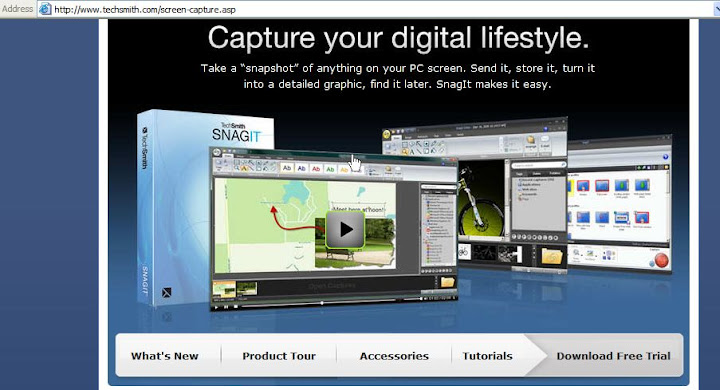

Use the coolest tool to save the desktop print state, video or picture in the file with good color presentation and less bytes.
I use SNAGIt.
I use SNAGIt.
I use SNAGIt.
Comments from those who selected Snagit as one of their Top 10 Tools in 2008.
source http://www.c4lpt.co.uk/Top100Tools/snagit.html
TECHSMITH: SnagIt: Capture your digital lifestyle. Capture anything you see on the screen. Edit and combine those captures. Share them via your favorite applications. Organize and find them again later. The more you use SnagIt, the more ways you'll find to use it. Want to get a laugh? Add a speech balloon to that photo of your cat and fire it off in an instant message. Need to make an impression at work. Capture that sales chart and point out important details with a
sleek-looking arrow. SnagIt can turn a simple screenshot into a powerful information graphic. SnagIt is versatile, yet surprisingly simple.
Version 9.0 add sequential capture, multi-image capabilities, ribbon-based menus, auto-store images, image tray, quick Access toolbar, automatic tagging, custom tagging as one image or batch, flags, visual search pane, and visual bookmarking.
Use the coolest tool to save the desktop print state, video or picture in the file with good color presentation and less bytes.
I use SNAGIt.
I use SNAGIt.
I use SNAGIt.
Comments from those who selected Snagit as one of their Top 10 Tools in 2008.
source http://www.c4lpt.co.uk/Top100Tools/snagit.html
- "the world’s greatest screen capture tool – it doesn’t get much better than this – and yet it keeps getting better all the time. Around $50, if it is your first go at it – download a free trial." Bonni Stachowiak
- "In the past, I used to capture screenshots, copy them into my imaging tool and mess around with them there. But inspired by the high ranking of SnagIt on the Top 100 Tools for Learning 2007 list, I tried out the free version. SnagIt makes the whole process so much easier - I'm hooked." Jane Hart
- "the BEST screen capture program" Patti Shank
- "It is one great tool for creating of the tutorials and presentations." Malinka Ivanova
- "It is a commercial tool and that is annoying, but luckily I managed to register it for free (during the free special offer) which has expired!). I have found this tool to be really excellent for capturing and creating customized graphics on-the-fly (within seconds!) for my learning adventure (ZaidLearn)." Zaid Alsagoff
- "This is my visual Swiss army knife, so much more that a screen capture tool, great for livening up PowerPoint and blog articles" Patrick Mayfield
- "The one tool that every trainer MUST have in his/her toolbox." Ed Lamaster
- "Great image tool" Paulo Simões
- "This is the single most-used tool I own. Intuitive, quick, and versatile. My organization recently had something of a crisis involving the implementation a new piece of software, and I was able to create, narrate, and launch a video tutorial in under an hour with SnagIt. (You know it does video, don’t you?) Problem solved; you can’t ask more from a tool" Jane Bozarth
- "This is one groovy little graphics program. I use it all the time in creating training materials, and have even used it to record a self-study training video for a system application (creates an avi file." Shari Ward
- "with all the Web 2.0 tools around, I still enjoy using SnagIT to do a whole host of jobs for me. I load Snagit onto every single machine I own." Judy O'Connell
- "Really great to capture images, edit them, and use them in my eLearning content." Juan Antonio Ortiz
Sunday, July 6, 2008
Freeware: Logmein
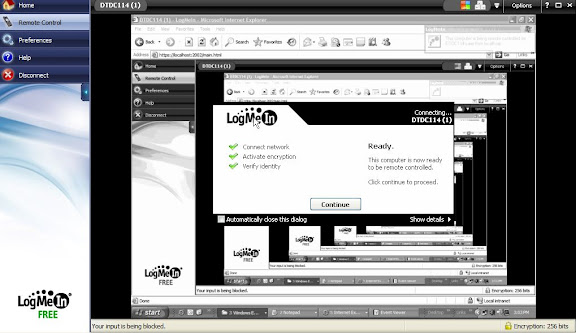
EXAMPLE how I connected my PC to itself as a dummy remote connection.
You can see windows within each .
https://secure.logmein.com/
Control your PC from anywhere is too tempting. I did a demo version for 30 days and it also includes one free account where you can log in to multiple computers defined as free connection except that you dont get any additional features. Still worth its money as freeware.
Being from India, I appreciate this when I comapre to webex. Teamplayer is another software which I have used to relay desktops across remotes. I believe Logmein is superfast and it works client to client unlike webex where it is client-> server -> client . Logmein alos uses a anaonymous id with a server authentication certicate. The Print functionality of windows is used by Logmein from its basic look.
I being a consultant hardly care. However I also had a problem with windows registry lock with logmein. So please double check if any software is installed if your have a registry lock. This I will cover in another Blog where I will focus on problems on registry lock in my workplace.
All in all, Logmein scores 8 out of 10. Very good for independent consultants, IT service providers
')
BASIC OPTIONS WITH LOGMEIN
Subscribe to:
Posts (Atom)

 Posts





